Application Workspace
One job, one workspace. Keep your tailored CV, cover letter, and notes together.
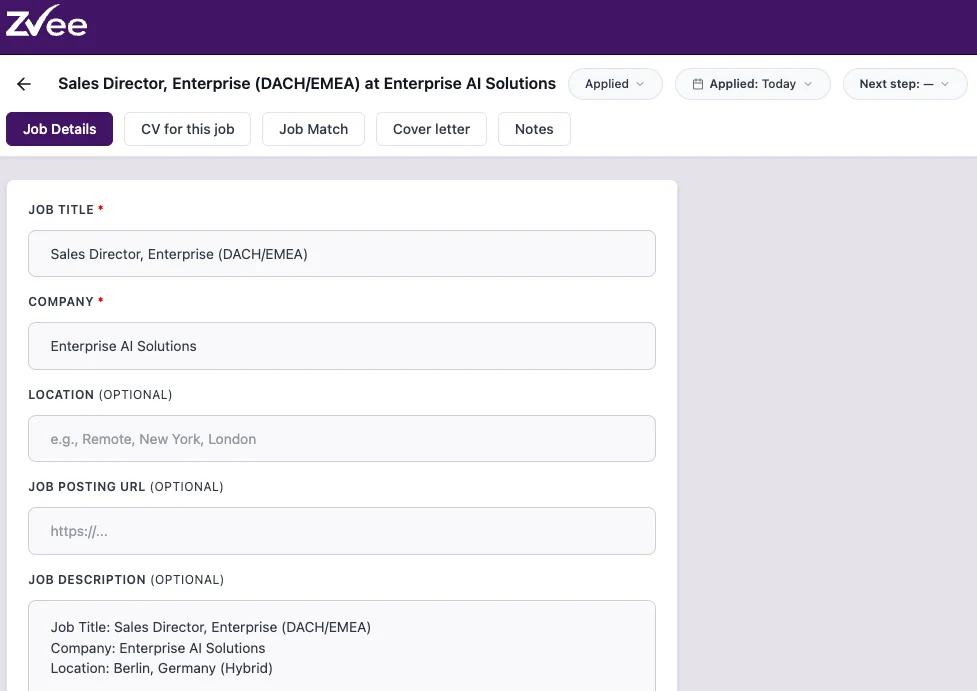
When you apply for multiple jobs at once, version control becomes the real problem. Which CV did you send to that company? Did you update the cover letter for this role? Did you run Job Match before applying? The Application Workspace keeps your tailored CV, cover letter, job description, and notes together in one place per application. There is no confusion about what you sent, what you updated, or where you left off.
Benefits
One workspace per application eliminates the risk of sending the wrong version or referencing the wrong company.
Changes you make inside an application workspace stay inside that workspace.
Having it in the same workspace means you never have to switch tabs or search for the posting while you are working.
Notes, status updates, and next steps all live in the same place so nothing falls through the cracks.
How it works
Any edits are completely independent - they do not modify the Master CV or any other workspace.
This activates Job Match and cover letter generation for that specific role, using the posting as the reference for both.
Work through the application in sequence so you never lose context between steps.
Use the notes section to record the recruiter name, interview date, and anything relevant to that application.
FAQs
Tips for best results
- Create a new workspace for each role you apply to, even if the roles are similar. Small differences in job descriptions often require targeted edits that are not worth mixing across applications.
- Add the full job description immediately when you create the workspace. Job Match and cover letter generation both depend on it, and job postings are often removed once a role closes.
- Use the notes section to record interview details as soon as you have them. The workspace is the logical place to keep preparation notes alongside the documents you used to get the interview.
- Run Job Match before you apply, not after. It takes a few minutes and often surfaces a quick-win edit that meaningfully improves your match score before the application goes in.