Application Tracker
Stop using spreadsheets. Track every application, status, and version in one view.
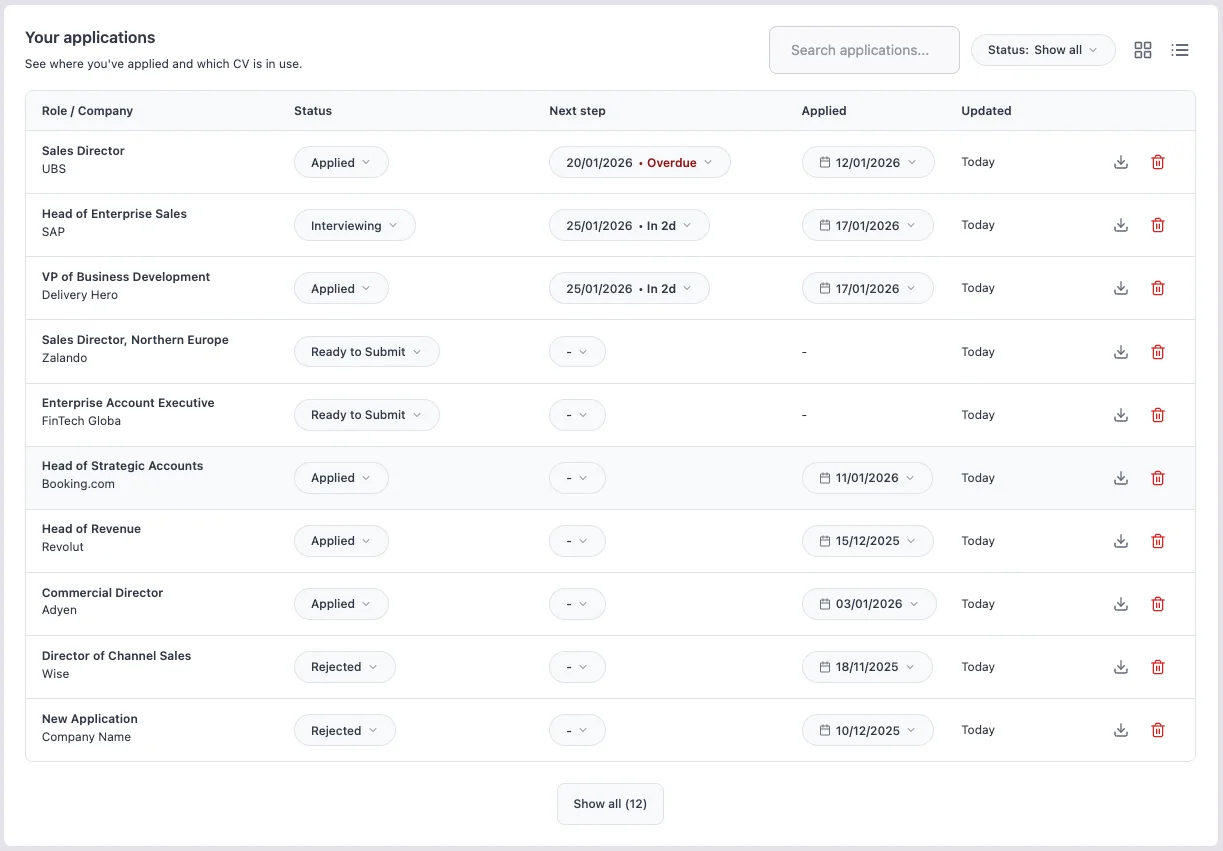
Tracking job applications on a spreadsheet works until you are managing ten or more at once. Then keeping statuses current, remembering which CV version you sent, and knowing what your next step is becomes a task in itself. The Application Tracker gives you a single view of your entire job search pipeline - from first draft to offer - with a direct link to the workspace where all the documents and notes for each role live.
Benefits
A clear pipeline view shows exactly where each application stands without scrolling through a spreadsheet.
One click takes you from the overview to the CV, cover letter, Job Match results, and notes for that role.
The tracker keeps everything attached to the application it belongs to.
The tracker makes the connection between role and document explicit, so you always know what went where.
How it works
This creates a workspace linked to that tracker entry - you can start tailoring immediately or return to it later.
Setting a next step and a date turns the tracker into an active list, not just a log.
The tracker shows where things stand; the linked workspace holds the documents, notes, and job description.
Switch between the tracker and workspace as needed without losing any context.
FAQs
Tips for best results
- Update the status every time something changes, including rejections. An accurate tracker shows the real state of your job search, not a wishful one.
- Set a next step for every active application. Without one, applications drift in the same status indefinitely and you lose momentum.
- Use the tracker to spot patterns in your results. Not getting interviews suggests a CV or targeting problem. Getting interviews but not offers suggests an interview preparation problem. The two require completely different fixes.
- Add the full job description to the workspace before the posting disappears. Many companies remove listings once a role is filled, and you will want the original text for interview preparation.