AI CV Assistant
Beat writer's block. Let AI draft your professional summary and achievements and suggest relevant skills in seconds.
The hardest part of writing a CV is not knowing your own experience - it is translating it into the language recruiters expect. Most people describe what they did rather than what they achieved, and the difference matters. The AI CV Assistant generates a first draft of your professional summary and achievement-style bullets from your existing CV entries, giving you something concrete to react to rather than a blank page. You review every claim, cut what does not fit, and rewrite in your own voice. The AI provides the starting draft; you provide the accuracy.
Benefits
You start from something concrete and improve it, which is faster than staring at a blank page.
The AI rewrites your entries to follow an impact-first structure - what you did, how you did it, and what changed because of it.
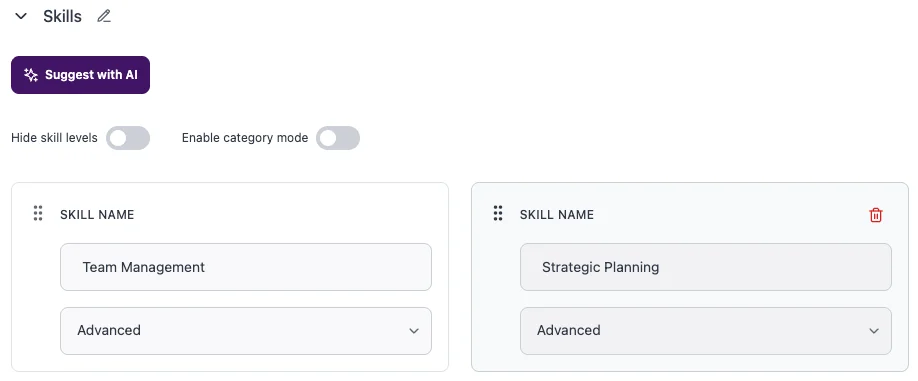
The skill suggestion scan surfaces competencies from your work history that you have never listed explicitly.
The AI references the requirements of that role and surfaces the parts of your background that match it most directly.
Every generated sentence is yours to accept, edit, or delete.
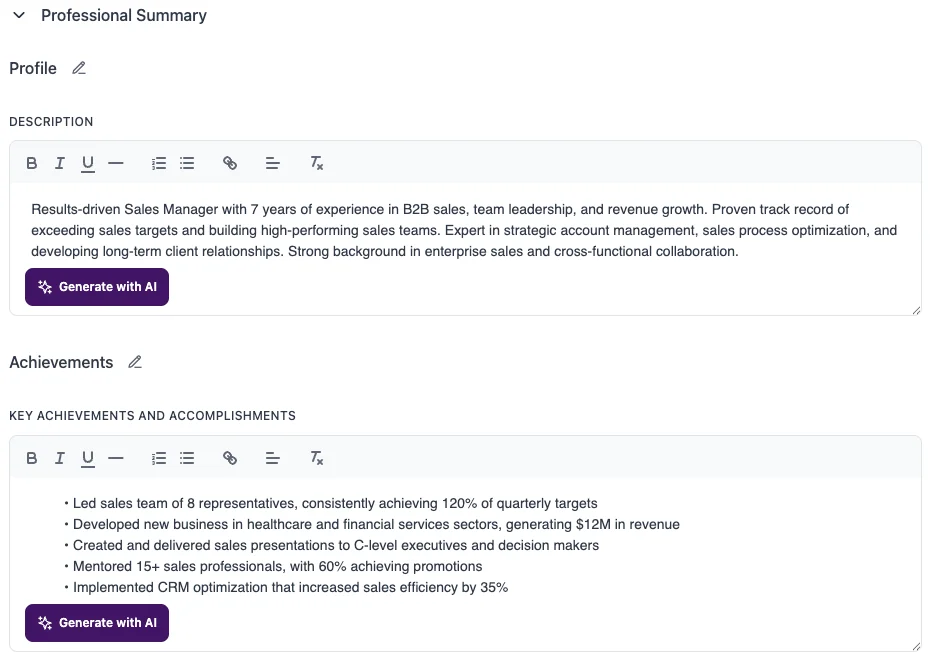
How it works
The more detail you put in, the more specific the output.
Generation takes a few seconds and the result appears in the editor for you to review.
Review the list, add the ones that are accurate and relevant, and remove any that do not apply.
The AI uses it as a reference to surface relevant experience and include keywords that match the role's requirements.
Rewrite anything vague, generic, or that does not sound like you.
FAQs
Tips for best results
- Add your work experience entries before generating. The more specific your entries - job titles, company context, responsibilities, key projects - the more specific the AI draft. Sparse input produces sparse output.
- After generating, read every sentence out loud. If it sounds generic or could describe anyone in your industry, replace it with a specific detail from your actual experience.
- If you are tailoring for a specific role, add the job description before generating rather than after. The draft will reference the role's requirements from the start, which means less rewriting.
- Use skill suggestions as a checklist, not a shopping list. Add a skill only if you can back it up in an interview. A skill you cannot discuss when asked is worse than not listing it at all.